
Drupal 10 reaches end of life on 9 December 2026. This date is known as Drupal 10 EOL. After that date there will be no new Drupal 10 releases, which means no more security fixes for Drupal 10 core. Drupal 10.6 is the last minor version. Your site will keep working, but every vulnerability found from then on stays open. The recommended path is to upgrade to Drupal 11, which is supported until at least mid to late 2028.
Key takeaways
- Drupal 10 EOL is 9 December 2026. Security support for Drupal 10.6.x ends the same week.
- Your site does not go offline. It simply stops receiving security fixes, so the risk grows with every new vulnerability.
- Upgrade to Drupal 11. You cannot jump from Drupal 10 straight to Drupal 12.
- Drupal 11 needs PHP 8.3 or later, Composer 2.7.0 or later and Drush 13.
- Start with the Upgrade Status module. It shows what blocks your upgrade before you spend any time on it.
Below: the key dates, what actually changes on 9 December, the risks of staying on Drupal 10, the Drupal 11 requirements, a step-by-step upgrade plan with the exact commands, and answers to the questions site owners ask most.
Drupal 10 support end date and key dates
The Drupal 10 support end date is fixed by the Drupal core release schedule. These are the dates that matter for a Drupal 10 site:
| Date | What happens |
|---|---|
| Week of 29 June 2026 | Drupal 11.4.0 released.Security support ends for Drupal 11.2.x and 10.5.x. Sites on 10.5 or older should already be on 10.6. |
| Week of 7 December 2026 | Drupal 12.0.0 is scheduled for release. Security support ends for Drupal 11.3.x and 10.6.x. |
| 9 December 2026 | Drupal 10 end of life. No new Drupal 10 releases after this date. |
| 21 April 2027 | Last day of security support for Drupal 11.4.x. |
| Mid to late 2028 | Drupal 11 long-term support (LTS) ends, at the earliest when Drupal 13 is released. |
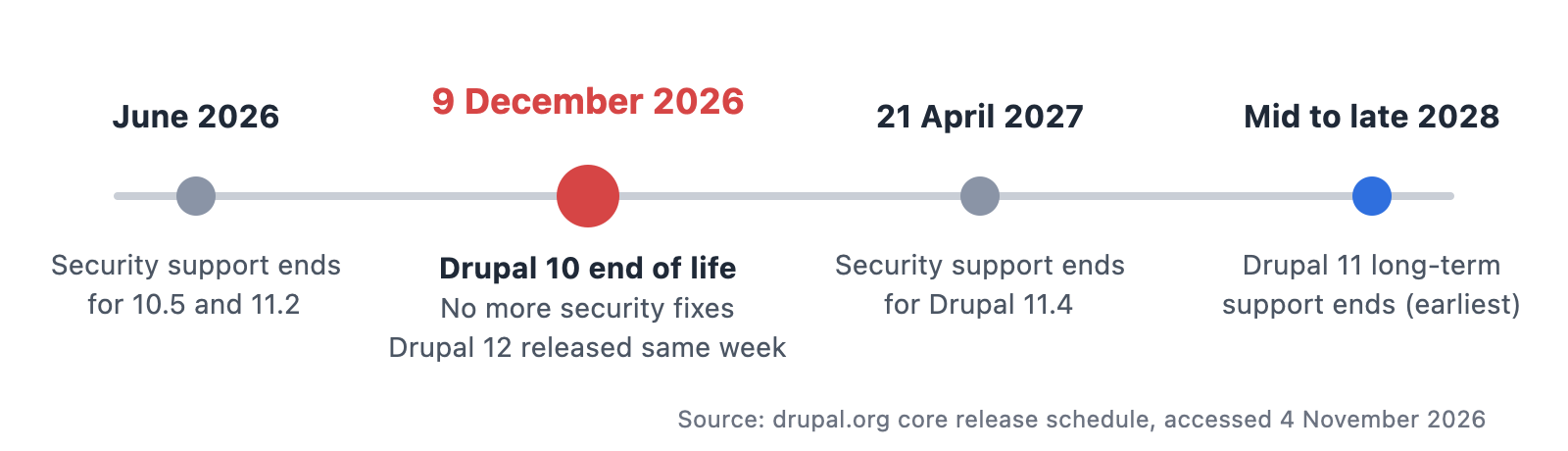
Drupal 10 end of life timeline: security support for 10.5 ends in June 2026, Drupal 10 end of life on 9 December 2026 with Drupal 12 released the same week, Drupal 11.4 support ends 21 April 2027, Drupal 11 long-term support ends in mid to late 2028
Release windows are published by the Drupal core team and can move. Check the official release schedule for the latest dates.
What happens when Drupal 10 reaches end of life?
When Drupal 10 reaches end of life, the Drupal Security Team stops publishing fixes for it. The software itself does not change. What changes is that nobody is maintaining it any more.
What stops
- Security releases for Drupal 10 core. When a new vulnerability is published, Drupal 10 will not get a fix.
- Bug fixes and new minor versions. Drupal 10.6 is the final minor release.
- Contributed module support, gradually. Module maintainers move their effort to Drupal 11 and Drupal 12. New module versions, and the security fixes that come with them, will increasingly require Drupal 11.
- Security advisories that cover your site. Security advisories published after end of life describe issues in supported versions. A Drupal 10 site may be affected by the same issue, with no official patch to apply.
What keeps working
- Your site does not switch off. Pages, content, users and integrations keep running on 9 December as they did on 8 December.
- Your content and configuration stay where they are. Nothing is deleted.
- Existing modules keep working in the versions you have installed.
In other words, the risk does not arrive as an outage. It grows quietly with every security advisory that your site can no longer apply.
Drupal 10 EOL: the risks of staying
- Known, unpatched vulnerabilities. Once a vulnerability is public, automated attacks often follow quickly. Without a patch, your site is exposed for as long as it stays on Drupal 10.
- Compliance and procurement. Many organisations require supported software, especially public-sector bodies and companies with security certifications such as ISO 27001. Running an unsupported CMS can become a finding in an audit or a blocker in a tender. For organisations covered by NIS2, keeping systems patched is part of the expected security baseline.
- Hosting and PHP. Hosting providers retire old PHP versions over time. An unsupported Drupal version makes it harder to stay on a supported PHP version, and an unsupported PHP version is a second security gap on top of the first.
- Modules you can no longer update. When a contributed module releases a fix only for Drupal 11, a Drupal 10 site cannot install it. Over time, more of the site is frozen in old versions.
- Higher cost later. The longer a site stays behind, the more modules, custom code and integrations drift out of date, and the bigger the eventual upgrade becomes.
Upgrade to Drupal 11 now, or wait for Drupal 12?
Upgrade to Drupal 11 now. The Drupal 12 release date is the week of 7 December 2026, the same week Drupal 10 security support ends, but waiting for it does not save you a step. Three reasons:
- You cannot skip a version. Drupal major upgrades are done in sequence, so a Drupal 10 site goes to Drupal 11 first and to Drupal 12 later.
- Drupal 11 has a long runway. It is supported until at least mid to late 2028, so an upgrade now protects the site for years.
- Drupal 12 raises the platform requirements. Drupal 12 requires PHP 8.5, MariaDB 10.11 and PostgreSQL 18. Many hosting setups will need time to get there, while Drupal 11 runs on today's standard stack.
Once your site is on Drupal 11 and its code is kept free of deprecated APIs, the later step to Drupal 12 is usually much smaller than the step from Drupal 10 to 11.
What you get with Drupal 11
An upgrade is mainly about staying supported, but Drupal 11 also brings improvements you can use:
- A modern foundation. Drupal 11 is built on Symfony 7 and PHP 8.3, so it benefits from the performance and security work in both.
- Recipes. Recipes let you add a complete feature, such as a blog, events or a contact form, with its modules and configuration in one step.
- Drupal CMS. The ready-to-use Drupal CMS product is built on Drupal 11, and its features and recipes are available to Drupal 11 sites.
- A cleaner core. Rarely used modules were moved out of core, which leaves less code to maintain and secure.
- A shorter path to Drupal 12. A site that is kept current on Drupal 11 is close to ready for the next major version.
Drupal 11 requirements: is your server ready?
Check your hosting before you plan anything else. If the server does not meet the Drupal 11 requirements, that is the first thing to fix.
| Component | Drupal 11 requirement |
|---|---|
| PHP | 8.3 or later |
| Database | MySQL 8.0, MariaDB 10.6, PostgreSQL 16 or SQLite 3.45 (with json1) |
| Composer | 2.7.0 or later |
| Drush | 13 |
| Web server | Apache 2.4.7 or later, or Nginx. IIS is no longer supported. |
| Starting point | Drupal 10.3 or later (ideally the latest 10.6 release) |
A practical tip: Drupal 10.6 also runs on PHP 8.3. Move the server to PHP 8.3 while you are still on Drupal 10, test, and only then upgrade Drupal. Changing one thing at a time makes problems much easier to trace.
Modules removed from Drupal 11 core
Six modules that were part of Drupal 10 core are no longer in Drupal 11 core. They still exist as contributed modules. If your site uses any of them, install the contributed version before the upgrade, while you are still on Drupal 10.
| Module | What it does | What to do |
|---|---|---|
| Book | Hierarchical, book-style pages | Install the contributed Book module |
| Forum | Discussion forums | Install the contributed Forum module |
| Statistics | Counts content views | Install the contributed module, or switch to your analytics tool |
| Tour | Guided tours of the admin UI | Install the contributed Tour module, or uninstall if unused |
| Activity Tracker | Lists recent content and activity | Install the contributed Tracker module, or uninstall if unused |
| Actions UI | Admin interface for configuring actions | Install the contributed module, or uninstall if unused |
If a module is enabled but nobody uses it, uninstalling it is often the simplest option. The Upgrade Status module flags each of these for you.
How to upgrade Drupal 10 to 11: a 6-step plan
This is the process we follow for a Drupal 10 to 11 upgrade. The exact work depends on your site, but the order of steps stays the same.
Step 1: Take stock
Write down your exact Drupal version (Reports → Status report), every contributed module and theme, all custom modules, and integrations with other systems such as CRM, payment, search or single sign-on. Note who owns each integration, because you will need them for testing.
Step 2: Update to the latest Drupal 10
You need at least Drupal 10.3 to upgrade to Drupal 11. Ideally move to the latest 10.6 release first and update all contributed modules to their latest versions, so the jump to 11 is as small as possible.
Step 3: Check the server
Compare your hosting with the Drupal 11 requirements above. Upgrade PHP to 8.3, and the database if needed, while still on Drupal 10.
Step 4: Scan your code with the Upgrade Status module
Install the Upgrade Status module on a development copy of the site and run the scan from Reports → Upgrade status. It shows:
- contributed modules and themes that do not yet have a Drupal 11 compatible release, or need an update to one;
- deprecated code in your custom modules and theme;
- environment problems, such as the PHP or database version;
- modules removed from Drupal 11 core that your site still uses.
Drupal Rector fixes many deprecations in custom code automatically. Run it, review the changes, and fix the rest by hand. For contributed modules without a Drupal 11 release, check the module's issue queue: there is often a patch, a newer development release, or a recommended replacement.
Step 5: Upgrade on a staging copy first
Run the upgrade on a staging copy of the live site, never directly on production. With a standard Composer-based project, the core of the upgrade looks like this:
composer require 'drupal/core-recommended:^11' 'drupal/core-composer-scaffold:^11' 'drupal/core-project-message:^11' 'drush/drush:^13' --no-update
composer update
drush updatedb
drush cache:rebuild
If the project uses drupal/core-dev, require ^11 for it as well. When Composer refuses to update, the message names the package that blocks it, usually a contributed module that still requires Drupal 10. Update or replace that module and run the command again.
Then test the things that matter: forms, search, logins and permissions, editorial workflows, media, integrations, caching and page speed. Ask the people who use the site every day to try their usual tasks. They find problems that automated checks miss.
Step 6: Go live and monitor
Take a full backup of code, database and files, deploy, and watch error logs and key pages for the first days. Then put a routine in place for monthly updates and every Drupal security update, so the site never falls this far behind again.
How long does a Drupal 10 to 11 upgrade take?
It depends mostly on three things: how up to date the site already is, how many contributed modules it uses, and how much custom code it has. As a rough guide:
| Type of site | Typical duration |
|---|---|
| Well maintained, on a recent Drupal 10 release, mostly contributed modules | A few days |
| Some outdated modules, a custom theme, one or two integrations | One to two weeks |
| Many custom modules, several integrations, modules without a Drupal 11 release | Several weeks, most of it testing |
Running Upgrade Status first gives you a realistic picture before you commit to a date.
Your real Drupal 10 deadline is earlier than 9 December
For most sites, the date that matters is not 9 December 2026 but the day the upgrade has to start. The upgrade, the testing, a safe release window and any hosting change all have to fit before end of life. Security support for Drupal 10.6.x ends in the week of 7 December 2026, the same week Drupal 12.0 is released, so there is no grace period after the deadline.
Work back from 9 December
Use the upgrade times above and add time for testing and a release window:
| If your site is | Typical upgrade time | Start at the latest |
|---|---|---|
| Well maintained, on a recent Drupal 10 release, mostly contributed modules | A few days | 3 weeks before end of life (around 18 November 2026) |
| Some outdated modules, a custom theme, one or two integrations | One to two weeks | 5 to 6 weeks before end of life (late October to early November 2026) |
| Many custom modules, several integrations, modules without a Drupal 11 release | Several weeks | Now, together with the risk-reduction steps below |
What pushes the deadline earlier
- Hosting. Drupal 11 needs PHP 8.3. If your host cannot provide it, you need a new host first, and a hosting move takes longer than the upgrade itself.
- December release freezes. Many organisations stop production changes before the holidays, and the people who test the site are often away. In practice the last safe release window can close in mid-December.
- Modules without a Drupal 11 release. If you depend on a maintainer, a patch or a replacement module, that wait is outside your control.
- Testing with the business. Integration owners and editors need time to check their part of the site. Book that time now.
- Outside help. Every Drupal 10 site has the same deadline. If you need an agency, ask for an estimate early.
If the table shows you are already late, follow the steps in "Can't upgrade before 9 December?" below to reduce the risk, and set a firm upgrade date. For an estimate based on your site, see our Drupal migration and upgrade services.
Common problems in a Drupal 10 to 11 upgrade
- A contributed module has no Drupal 11 release. Look for a patch in the issue queue, a maintained fork or a replacement module. As a last resort, the module can be taken into your custom code and maintained there.
- Composer dependency conflicts. Usually caused by a module or library pinned to an old version in
composer.json. Loosen the version constraint and update. - Deprecated code in a custom theme. Older Twig templates and JavaScript that depends on removed libraries are common. Upgrade Status and the browser console point to them.
- Patches that no longer apply. Patches listed in
composer.jsonmay already be included in the new version, or need to be rewritten. - The hosting cannot run PHP 8.3. This is a hosting decision, not a code fix. Sort it out early, because a move to a new host takes time.
Can't upgrade before 9 December?
If the deadline is too close, reduce the risk while you plan:
- Update to the latest Drupal 10.6 release and apply every available security update before 9 December.
- Update contributed modules to their latest releases that still support Drupal 10.
- Make sure backups are recent and tested, and that someone follows the security announcements on drupal.org.
- Reduce the attack surface: uninstall modules you do not use, remove unused admin accounts and restrict access to admin pages.
- Set a firm date for the Drupal 11 upgrade, ideally within the next few weeks, not months.
Frequently asked questions
What happens when Drupal 10 reaches end of life?
On 9 December 2026 Drupal 10 stops receiving new releases, including security fixes. The site keeps running, but any vulnerability discovered after that date will not be fixed for Drupal 10.
Will my Drupal 10 site stop working after end of life?
No. The site keeps running, and your content and configuration stay as they are. What stops is new releases, including security fixes, so the site becomes more exposed over time.
Can I upgrade from Drupal 10 directly to Drupal 12?
No. Upgrade to Drupal 11 first. From a well-maintained Drupal 11 site, the move to Drupal 12 is a smaller, separate step.
How long does a Drupal 10 to 11 upgrade take?
From a few days for a well-maintained site with mostly contributed modules, to several weeks for a site with a lot of custom code and integrations. Most of the time goes into testing.
How do I check which Drupal version I have?
Log in as an administrator and open Reports → Status report (/admin/reports/status). The Drupal version is listed at the top. With Drush, run drush status.
Is Drupal 10 still safe to use until the deadline?
Yes, as long as you are on Drupal 10.6 and apply security releases as they come out. Drupal 10.6 keeps receiving security fixes until end of life.
Do I need to rebuild my site to move to Drupal 11?
No. Unlike the move from Drupal 7, a Drupal 10 to 11 upgrade is done in place. Your content, users and configuration stay in the same database, and only the code is updated.
Need help with your Drupal 11 upgrade?
DevAtWork is a Drupal agency in Bucharest, Romania. We upgrade, migrate and maintain Drupal sites for organisations and digital agencies across Europe. If you want a clear estimate for your upgrade, tell us about your site or see our Drupal migration and upgrade services.
Sources
- Drupal core release schedule (drupal.org)
- Announcing Drupal 12.0.0 platform requirements (drupal.org)
- Drupal system requirements (drupal.org)
- Upgrade Status module (drupal.org)
- Drupal Rector (drupal.org)